
Are you juggling multiple projects, struggling to keep track of time, and finding it hard to manage your team’s productivity? If so, the Trackabi Time Tracker App might be your new best friend.
Designed specifically for freelancers and small to medium-sized enterprises, Trackabi offers a robust solution to streamline your operations.
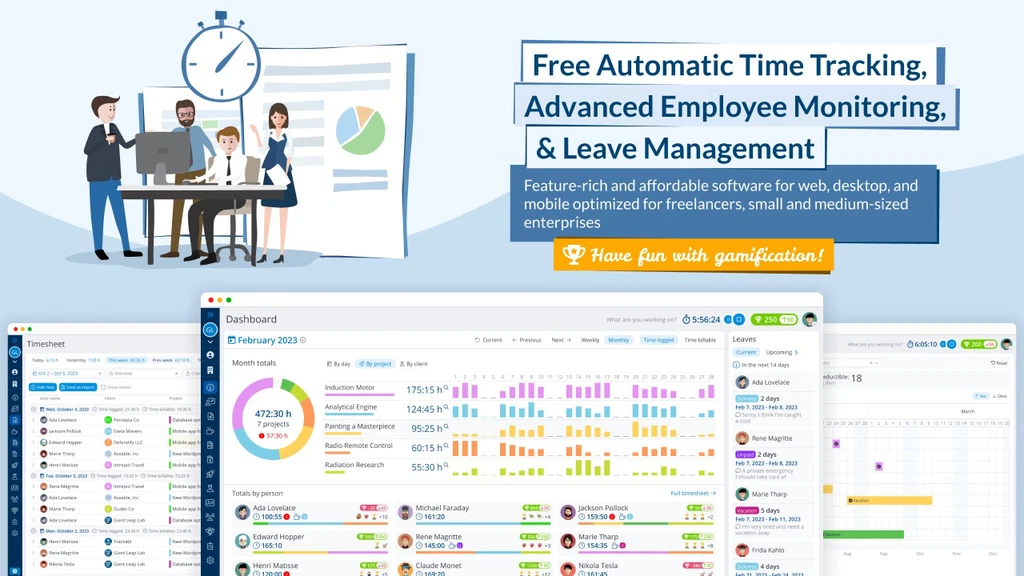
With features like automatic time tracking, advanced employee monitoring, and even gamification elements to boost team engagement, this app promises to transform the way you work.
Imagine having the ability to manage your projects, monitor employee activity, and handle leave requests all in one place. Picture the convenience of generating detailed reports, preparing invoices, and tracking client payments with ease.
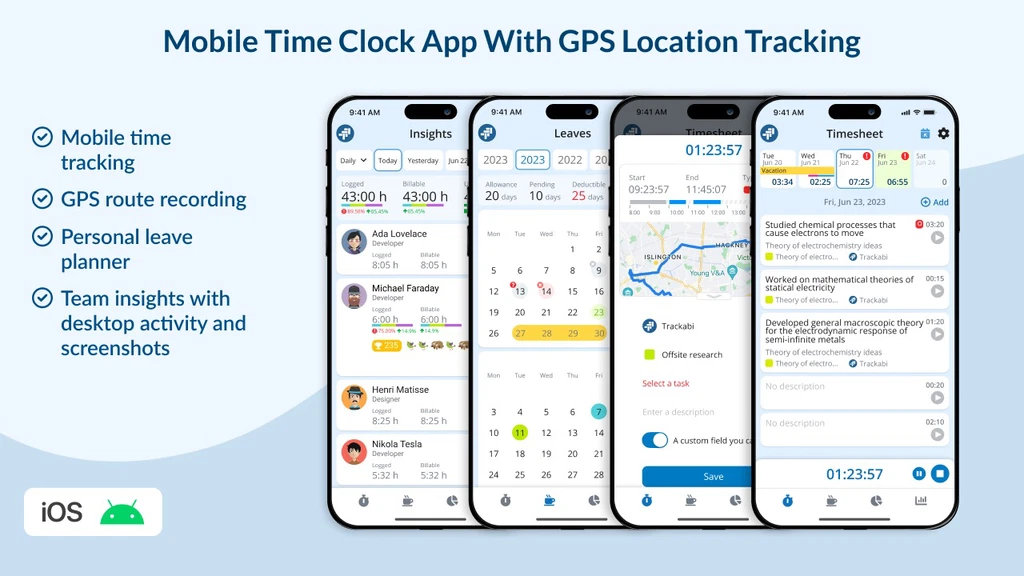
Trackabi even allows you to track time for offsite tasks using its GPS-enabled mobile app. Whether you’re working from your desktop, on the go with your mobile, or coordinating with your team, Trackabi ensures you have the flexibility you need.
Intrigued? You should be! Dive into our full review to discover how Trackabi can revolutionize your workflow and help you reclaim control over your time and resources. Don’t miss out on this opportunity to enhance your productivity.
Check out Trackabi now and see the difference for yourself. Ready to explore? Click here to learn more about Trackabi on AppSumo.
Introduction To Trackabi Time Tracker App
The Trackabi Time Tracker App is an innovative tool for freelancers and small to medium-sized businesses. It offers a complete solution for automatic time tracking, employee monitoring, and leave management.
The app is available on web, desktop, and mobile platforms, making it accessible and versatile for various operational needs.
Overview And Purpose
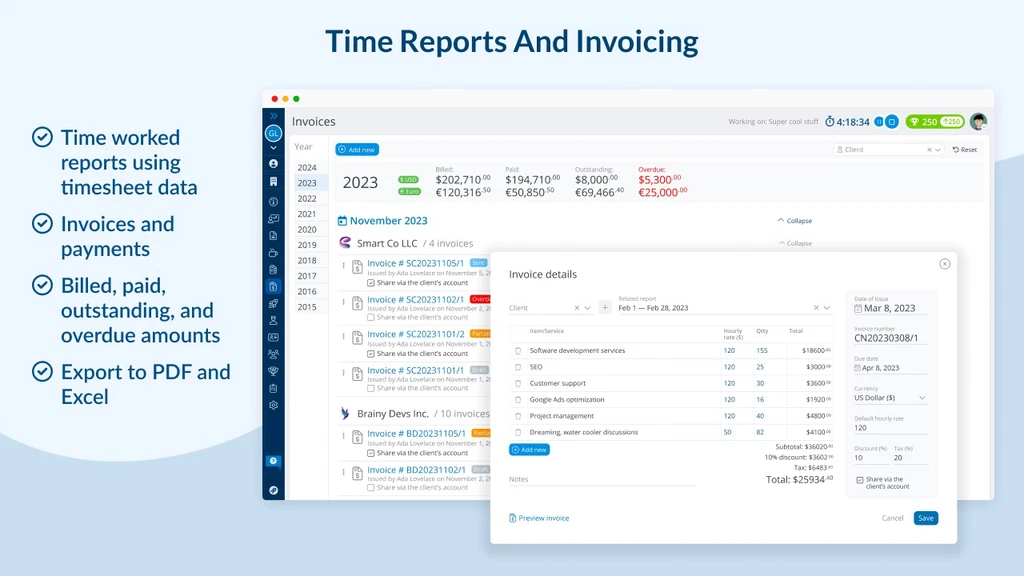
Trackabi is designed to streamline operations by providing an array of features tailored for effective time management. Users can choose between manual or timer-based time tracking and can generate detailed reports.
These reports can be exported to PDF or Excel formats, enhancing convenience and efficiency.
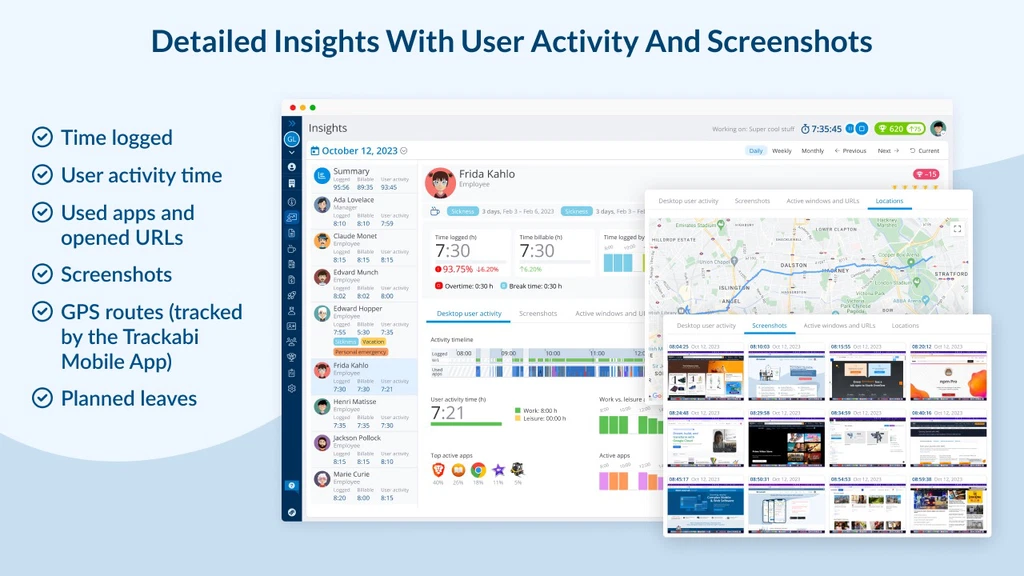
The app provides advanced employee monitoring capabilities, allowing employers to track employee activities, visited URLs, and application usage. The Employee Leave Planner function helps in managing vacation schedules effectively.
Additionally, it supports project planning by offering tools to develop plans, estimates, and expenses with task and milestone breakdowns.
How Trackabi Stands Out In The Time Tracking Market
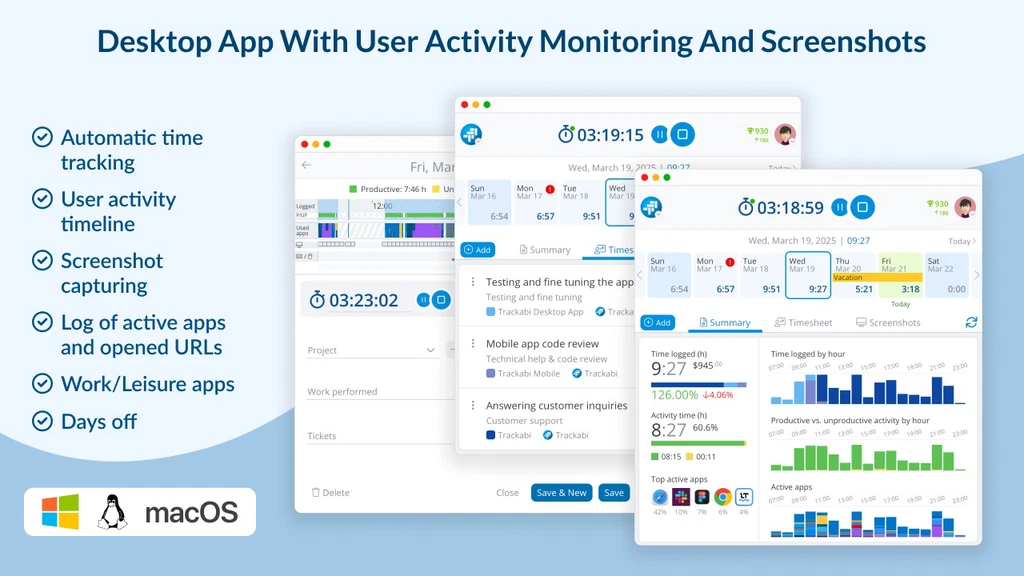
Trackabi distinguishes itself through its comprehensive feature set. The Desktop Timer Application automates time tracking with user activity monitoring and screenshot capturing. It also offers idle detection to ensure accurate time tracking.
Customizable user access roles allow businesses to control account access securely.
Another standout feature is the Time Tracking Gamification, which boosts team motivation through achievements and badges. This gamification aspect is especially beneficial for improving employee engagement. Furthermore, the mobile app includes GPS route tracking for offsite tasks, facilitating efficient monitoring of team activities.
Trackabi’s pricing model is flexible, starting with a free tier for new users. This allows businesses to explore the platform before committing to a paid plan. For more details on pricing and other features, visit the Trackabi website.
Key Features Of Trackabi
Trackabi stands out as a robust tool for freelancers and businesses. It offers diverse features that enhance productivity and streamline operations. Below, explore the key features that make Trackabi a preferred choice for time tracking and management.
Intuitive User Interface For Easy Navigation
Trackabi provides an easy-to-use interface. Users can navigate effortlessly across web, desktop, and mobile platforms. The design is clean and user-friendly, ensuring that even beginners can manage tasks efficiently.
Advanced Reporting And Analytics For Better Insights
Trackabi excels in generating detailed reports. Users can customize timesheets and export reports to PDF or Excel. These insights help businesses make informed decisions, improving overall management.
Flexible Time Tracking Options To Suit Various Needs
Trackabi offers versatile time tracking capabilities. Users can track time manually or use an automated timer. The desktop timer application also includes features like idle detection and screenshot capturing.
Team Collaboration Tools To Enhance Productivity
- Trackabi gamifies time tracking to boost team motivation.
- It includes achievements and badges to engage employees.
- Project plans and expenses can be managed with task breakdowns.
Privacy And Data Security Features For Peace Of Mind
Trackabi prioritizes user privacy and data security. It adheres to a Privacy Policy, Terms of Use, and Cookie Policy. These policies are accessible on their website, ensuring that user data remains protected.
Pricing And Affordability
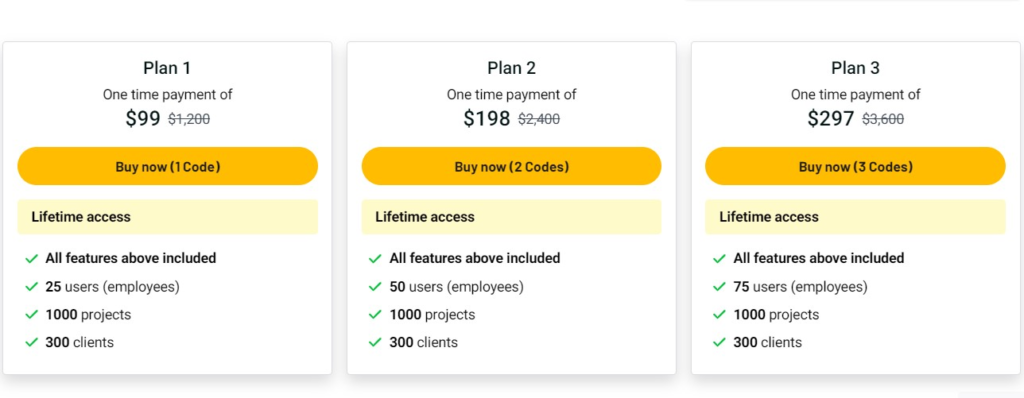
Discovering the right time tracking tool often hinges on its pricing. Trackabi Time Tracker App offers a variety of plans aimed at different needs. Understanding its pricing structure is key to determining its affordability.
Breakdown Of Pricing Plans
Trackabi provides users with a free tier to begin exploring its features. This is a great starting point for those new to time tracking. For advanced functionalities, additional pricing details are available on the Trackabi website. Here’s a simple overview:
- Free Tier: Basic features to get started.
- Paid Plans: Unlock comprehensive features for enhanced productivity.
Each plan is designed to cater to different business sizes, from freelancers to medium-sized enterprises. This ensures flexibility and scalability in operations.
Cost-effectiveness Compared To Competitors
Trackabi stands out in the cost-effectiveness department. Many competitors offer similar features but at higher prices. Here’s a comparison:
| Feature | Trackabi | Competitors |
|---|---|---|
| Free Tier | Available | Limited |
| Advanced Monitoring | Included | Extra Cost |
| Leave Management | Included | Extra Cost |
Trackabi offers comprehensive features at a competitive rate, making it an attractive choice for budget-conscious users. The free tier provides an excellent opportunity to test core functionalities before committing to a paid plan.
Choosing Trackabi ensures value for money. Users gain access to advanced tools without straining their budgets.
Pros And Cons Of Trackabi
Trackabi Time Tracker App offers a range of features for businesses. It caters to freelancers and small to medium enterprises. Understanding its pros and cons helps users make informed decisions. Below, we explore the advantages and limitations of Trackabi based on user feedback.
Advantages Based On User Feedback
Trackabi has received positive remarks for its comprehensive features. Users appreciate the automatic time tracking and detailed employee monitoring. The ability to track visited URLs and application usage is a significant advantage.
- Comprehensive Time Tracking: Manual or timer-based tracking with customizable timesheets.
- Employee Monitoring: Detailed tracking of activities enhances productivity insights.
- Leave Management: Efficiently manage vacation schedules and leave requests.
- Multi-Platform Access: Available on web, desktop, and mobile, providing flexibility.
- Gamification Features: Motivates teams through achievements and badges.
- Free Tier Availability: A free option allows users to test features without commitment.
Limitations And Potential Areas For Improvement
While Trackabi has many strengths, users have noted some areas for improvement. The lack of specific refund or return policies can be a concern for new users.
- Interface Complexity: Some users find the interface challenging initially.
- Limited Refund Information: No clear refund policy is specified, which might deter potential users.
- Customization Constraints: Users desire more options in customizing reports and dashboards.
- Integration Challenges: While integration is supported, not all popular tools are included.
Despite these limitations, many users find Trackabi beneficial for their operation management. Its strengths in time tracking and employee engagement are highlighted often. Trackabi continues to evolve, addressing user feedback for improvements.
Ideal Users And Scenarios For Trackabi
Trackabi is a versatile time tracking tool suited for freelancers and small teams. Its diverse features make it ideal for different working environments. Whether managing projects or monitoring employee activities, Trackabi provides tailored solutions.
Best Use Cases For Freelancers And Small Teams
Freelancers benefit from Trackabi’s time tracking and reporting features. It helps them monitor hours accurately and generate reports for clients. The desktop timer application ensures freelancers stay focused with idle detection and screenshot capturing.
- Generate invoices with ease.
- Manage projects with milestones.
- Track offsite tasks using the mobile app with GPS.
Small teams can use Trackabi to enhance productivity. The employee monitoring feature tracks activity and application usage. Team leaders can oversee project plans, expenses, and task breakdowns efficiently.
Scenarios Where Trackabi Excels
Trackabi excels in scenarios requiring detailed employee insights. It offers advanced monitoring capabilities, tracking URLs and application usage. This is particularly useful for remote teams and those in operations.
- Manage employee leave with the leave planner.
- Motivate teams through gamification with badges and achievements.
- Control account access with customizable user roles.
The app’s flexibility across web, desktop, and mobile platforms ensures seamless integration into various work environments. Businesses can integrate Trackabi with popular time trackers and Git commits for enhanced functionality.
| Feature | Benefit |
|---|---|
| Time Tracking & Reports | Accurate tracking and report generation. |
| Employee Monitoring | Detailed activity insights. |
| Project Plans & Expenses | Effective project management. |
With a free tier available, users can start exploring Trackabi without a financial commitment. This flexibility makes it an attractive option for small businesses.
Frequently Asked Questions
Is Trackabi Safe?
Trackabi prioritizes security with robust encryption and privacy policies. User data is protected and regularly monitored. The platform complies with industry standards to ensure a safe experience for users. Trust is maintained through transparent practices and continuous improvements in security measures.
What Is The Best Time Tracking App?
Toggl Track is a top choice for time tracking. It offers user-friendly features and seamless integration. Its simplicity and detailed reporting make it ideal for freelancers and teams. With mobile and desktop apps, it keeps track of time effectively. Users appreciate its efficiency in managing work hours.
Does Trackabi Take Screenshots?
Trackabi can take screenshots. Users can enable the feature in settings for automatic screen capture. Screenshots help monitor productivity and ensure accuracy. Privacy settings allow control over what is captured, ensuring security.
Conclusion
Trackabi Time Tracker App offers valuable tools for efficient time management. It supports freelancers and businesses with reliable tracking and detailed monitoring. Users enjoy flexibility across web, desktop, and mobile platforms.
Features like gamification boost engagement and productivity. The app provides detailed insights for managing employees and projects effectively. Explore Trackabi’s offerings here.
The user-friendly design and comprehensive features make it a worthy consideration for improving operations. Visit the official Trackabi site for more details on pricing and features.