Have you ever wished design could be easier, faster, and still look professional? Whether you’re creating social media posts, presentations, or branding materials, the pressure to deliver eye-catching visuals can feel overwhelming.
But what if you had a secret weapon—tools that could transform your ideas into stunning designs in seconds? You’ll discover 10 powerful AI design generators, like Canva’s Magic Studio, that are changing the game for creators like you. These tools don’t just save you time; they help you unlock creativity you didn’t even know you had.
Ready to find your new favorite design hack? Let’s dive in!
AI-powered Design Tools
AI-powered design tools are transforming the way people create visual content. These tools simplify the design process and make it accessible to everyone. They combine smart algorithms with user-friendly interfaces. This allows users to create stunning visuals without advanced design skills.
Whether you’re designing social media posts, logos, or presentations, AI tools can help. They analyze your input and generate designs that align with your goals. Many platforms like Canva Magic Studio now include AI features. These features help users save time and produce professional-quality results effortlessly.
What Makes AI Design Tools Unique
AI design tools stand out because they automate repetitive design tasks. They reduce the need for manual adjustments by predicting what users need. These tools often use machine learning to improve designs based on user preferences. For example, they can suggest color palettes that match your brand.
Another unique feature is the ability to generate multiple design options instantly. Traditional design methods require hours of trial and error. AI tools speed up this process by offering templates and auto-generated layouts. This makes creating polished designs faster and more efficient.
How AI Enhances Creativity
AI tools inspire creativity by offering endless design possibilities. They provide smart suggestions for fonts, layouts, and images. These recommendations help users experiment with new ideas they may not consider otherwise.
AI also frees users from technical tasks, allowing more focus on creativity. For instance, background removal, resizing, and text alignment are handled automatically. This gives designers the freedom to explore unique visual styles and concepts. The result is better designs with less effort.

Canva Magic Studio
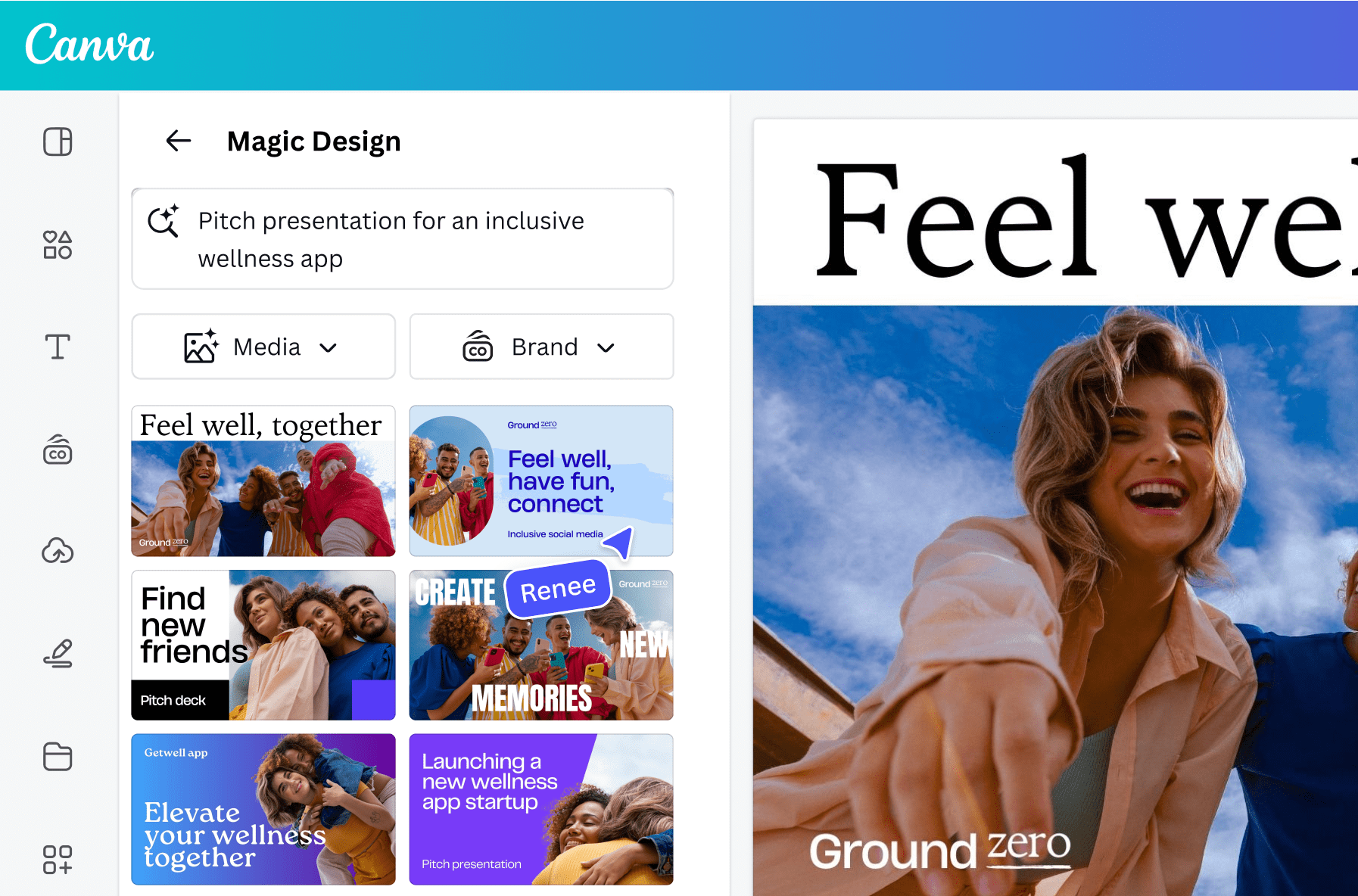
Canva Magic Studio is an advanced AI-powered design tool within Canva. It offers a range of features to enhance creativity and simplify design. This tool is designed for users of all skill levels. It helps create professional-quality visuals with minimal effort.
Features That Transform Design
Canva Magic Studio includes AI-assisted text generation. This feature creates engaging captions, descriptions, or headlines in seconds. It also offers AI-generated images tailored to your specific needs. Users can adjust styles, colors, and layouts with intuitive controls.
The tool has a background removal feature. It eliminates unwanted elements from photos with a single click. The magic resize option enables users to adapt designs for different platforms instantly. It supports seamless integration with templates and assets available on Canva.
Another standout feature is the auto-animation tool. It adds dynamic effects to graphics effortlessly. This enhances presentations and social media posts. These tools are designed to save time and boost creative output.
Why It’s A Game-changer For Creatives
Canva Magic Studio simplifies complex design processes. It allows users to focus on creativity instead of technical details. Its user-friendly interface caters to beginners and professionals alike.
The AI-powered features make crafting visuals faster and more efficient. This tool minimizes repetitive tasks, freeing up time for innovation. It enables users to create visually appealing designs with ease.
Its ability to deliver quality results without advanced design skills makes it unique. Canva Magic Studio empowers individuals to bring their ideas to life effortlessly.
Adobe Firefly
Adobe Firefly is an AI-powered design tool created for creatives and professionals. It brings advanced AI features to simplify the design process. From generating unique visuals to automating tedious tasks, Firefly aims to make designing smarter and faster. It blends artificial intelligence with Adobe’s trusted design ecosystem, catering to users of all skill levels.
AI-driven Visual Effects
Adobe Firefly excels in producing stunning AI-driven visual effects. It allows users to generate high-quality textures, patterns, and gradients effortlessly. The tool uses AI to analyze your input and create visuals tailored to your needs. You can design eye-catching effects without extensive manual effort or expertise. It saves time while maintaining professional-grade quality. These effects are perfect for posters, social media, and branding projects.
Streamlining Professional Design
Firefly simplifies professional design tasks with its intuitive AI features. It automates processes like resizing, color matching, and element alignment. Designers can focus on creativity instead of repetitive adjustments. The tool also integrates seamlessly with other Adobe software. This ensures a smooth workflow for users familiar with Adobe’s ecosystem. Whether you’re creating a logo or editing a photo, Firefly enhances efficiency.
Figma AI Tools
Figma AI tools are transforming the way designers work on projects. These tools use artificial intelligence to simplify design tasks and enhance collaboration. They empower teams to create designs faster and with greater precision. With AI, Figma ensures that both beginners and experts can achieve professional results.
Figma’s AI features are integrated seamlessly, making them intuitive to use. Whether it’s streamlining workflows or automating repetitive tasks, these tools save time. Designers can now focus on creativity without being bogged down by mundane details.
Collaborative Design With AI
Figma AI tools make teamwork effortless. Designers can share projects in real-time and receive instant feedback. AI-powered suggestions enhance designs by providing smart recommendations during collaboration. This ensures consistency across projects and reduces errors.
Team members can work together on the same file, no matter their location. AI tools help maintain alignment by auto-adjusting layouts and ensuring proper spacing. This creates a smoother workflow and speeds up design revisions.
Prototyping Made Smarter
Prototyping in Figma is now faster with AI-driven features. The tools predict design patterns, enabling quicker creation of user interfaces. AI simplifies linking screens and interactions, making prototypes functional in minutes.
These tools also analyze user flows to suggest improvements. They help identify navigation issues and provide alternatives. This reduces testing time and ensures a better user experience.
Runway Ml
Runway ML is a powerful AI design tool for creators. It enables users to generate visuals and animations effortlessly. This platform has a wide range of AI-powered features. It caters to designers, artists, and video creators with diverse needs.
Creating Unique Visuals
Runway ML excels in generating unique visuals tailored to your project needs. It uses advanced AI algorithms to create images and art that stand out. Users can experiment with styles, colors, and patterns effortlessly. The platform simplifies creative exploration and saves time in the design process.
You can upload your own images or start from scratch. Runway ML adapts to your inputs and delivers personalized results. This makes it an excellent tool for both beginners and professionals.
AI For Video And Motion Design
Runway ML offers AI-powered tools for video and motion design. These tools help create animations, transitions, and visual effects efficiently. The platform supports editing and enhancing videos with minimal effort. Its AI features improve workflow by automating tedious tasks.
Users can transform static visuals into dynamic motion designs. Runway ML provides templates and customization options for creative freedom. This makes video design accessible even for those with limited experience.
Designify
Designify is a user-friendly AI-powered tool for graphic design. It simplifies complex design tasks, saving time and effort. Whether you’re an entrepreneur or a casual user, its features cater to all. With Designify, you can enhance, edit, and create visuals seamlessly. It’s a perfect choice for those who want quick, professional results.
Automating Image Enhancements
Designify excels in automating tedious image enhancement tasks. Its AI analyzes images and applies necessary adjustments automatically. It can improve lighting, remove backgrounds, and refine colors in seconds. The tool ensures your images look polished without manual effort. This automation eliminates the need for advanced design skills.
Perfect For Quick Edits
Designify is ideal for users needing fast, high-quality edits. Its intuitive interface allows you to make changes instantly. You can resize, crop, and adjust images without complexity. The platform is designed to deliver results with minimal steps. It’s a go-to solution for quick, professional edits on the fly.
Khroma
Khroma is a unique AI tool designed to assist designers with color choices. It simplifies the process of finding harmonious color palettes tailored to individual preferences. With its smart algorithms, Khroma helps users discover combinations that are visually appealing and functional.
AI-powered Color Palettes
Khroma uses advanced AI to create custom color palettes. It learns your favorite shades and generates unique combinations based on them. This saves time and eliminates guesswork in choosing colors. The tool ensures all palettes are aesthetically pleasing and aligned with design needs.
Personalized Suggestions For Designers
Khroma goes beyond generic recommendations by adapting to your tastes. It analyzes your preferences to suggest colors that resonate with your style. This personalization helps designers maintain consistency in projects. You can experiment with various palettes while staying true to your vision.
Looka
Looka is an AI design generator that simplifies branding for businesses. It enables users to create professional logos and brand assets effortlessly. This tool is ideal for startups, freelancers, and entrepreneurs. With Looka, building a brand identity is quick and intuitive. Its AI-driven process ensures tailored results for every user.
Building Logos With AI
Looka offers an AI-powered approach to logo design. You start by entering your business name and industry. The AI presents logo suggestions based on your preferences. You can customize colors, fonts, and layouts to match your vision. This makes it easy to craft unique logos without any design skills. The platform ensures high-quality logos that suit your brand.
Brand Identity Made Simple
Looka goes beyond logo design by offering complete brand kits. These kits include business cards, social media templates, and more. Everything is aligned with your logo’s style for consistency. The AI generates cohesive designs that maintain a professional look. This saves time and ensures your brand identity is well-defined. Looka simplifies the process so you can focus on growing your business.
Artbreeder
Artbreeder is a unique AI design generator known for its artistic capabilities. It allows users to create stunning visuals by blending creativity with AI technology. This tool has gained popularity among digital artists, designers, and creators. Artbreeder offers numerous features that simplify the process of creating art. Its intuitive interface ensures even beginners can enjoy the creative process.
Generating Artistic Portraits
Artbreeder excels at generating artistic portraits with minimal effort. It uses AI to combine and refine existing images into beautiful new creations. Users can explore endless possibilities by tweaking sliders for features like age, gender, and mood. This allows for dynamic and highly personalized portrait creation. The tool is perfect for creating profile pictures, avatars, or character designs. Each portrait feels unique, as if hand-painted by an artist.
Customizing Creative Inputs
Artbreeder stands out with its ability to customize creative inputs. You can upload your own images to shape the final artwork. The tool lets you blend your image with others to produce something fresh. Its sliders allow you to control specific attributes like facial structure or color schemes. This ensures your vision is reflected in the final design. The customization process is simple, making it accessible to all skill levels.
Deepart.io
DeepArt.io is an AI-powered design generator transforming photos into stunning artwork. It uses neural networks to mimic famous artistic styles. Users can convert their images into paintings inspired by renowned artists. This tool is perfect for anyone seeking unique, artistic visuals.
Turning Photos Into Artwork
DeepArt.io allows users to transform regular photos into artistic creations. Upload a photo, select an artistic style, and let the AI work. The tool processes the image to replicate the chosen style. Results often resemble works created by professional painters.
Whether it’s landscapes, portraits, or abstract designs, DeepArt.io delivers artistic results. It’s ideal for creating personalized artwork for home decor or gifts. The output maintains the essence of the original photo while adding artistic flair.
Exploring Styles With AI
DeepArt.io offers a variety of artistic styles to explore. Users can choose from classic styles like Van Gogh or Picasso. Modern and abstract styles are also available for unique designs. The AI adapts each style to match the uploaded photo.
This feature encourages creativity and experimentation. Users can try different styles to see what fits their vision. DeepArt.io makes it easy to explore and customize artistic possibilities.
Jasper Art
Jasper Art is an innovative AI design tool for creating stunning visuals. It blends technology and creativity to produce unique and professional designs. Businesses and creators use it to save time and elevate their content. Its intuitive interface makes it suitable for both beginners and professionals. Jasper Art is especially popular for marketing, social media, and branding visuals. This AI design generator focuses on efficiency and high-quality outcomes.
AI For Marketing Visuals
Jasper Art simplifies the creation of eye-catching marketing visuals. It offers templates tailored for ads, email campaigns, and social media posts. You can customize colors, fonts, and layouts with ease. The AI also suggests design elements that match your brand’s style. This ensures consistent and professional-looking graphics. Its precision helps businesses maintain a strong visual identity across platforms.
Expanding Creative Campaigns
Jasper Art enhances creativity in marketing campaigns. It generates fresh ideas by combining unique design elements. The AI recommends layouts based on your campaign’s theme or message. This keeps your visuals engaging and aligned with your goals. It also reduces the time spent brainstorming new concepts. With Jasper Art, teams can focus on refining their campaigns instead of starting from scratch.
Frequently Asked Questions
What Are AI Design Generators Used For?
AI design generators create visuals like logos, posters, and presentations. They save time and simplify the design process.
Is Canva Magic Studio An AI Design Tool?
Yes, Canva Magic Studio uses AI to automate design tasks like resizing, editing, and creating templates.
Are AI Design Generators Beginner-friendly?
Most AI design tools are beginner-friendly. They offer simple interfaces and pre-built templates for easy use.
Conclusion
AI design generators simplify creativity for everyone. Tools like Canva Magic Studio inspire unique designs fast. They save time, reduce effort, and offer versatile templates for projects. Beginners and professionals can both benefit from their intuitive features. With so many options available, finding the right tool is easy.
Explore and experiment to discover what fits your needs best. These platforms continue to evolve, bringing fresh possibilities to design. Let technology enhance your creativity and streamline your workflow today.